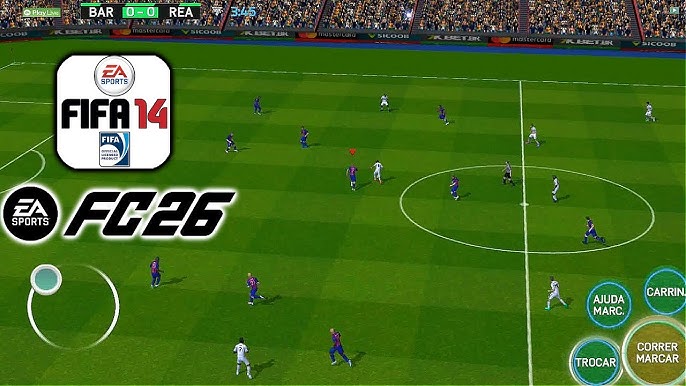
The FIFA 2026 Mod for FIFA 14 is a passion project from the modding community that takes the classic, beloved FIFA 14 engine and injects the 2025/2026 season into it. EA Sports might be fully focused on their FC series now, but any real mobile gamer knows the classic FIFA 14 engine is still the king of offline stability. The modders have outdone themselves with updated graphics, fresh kits, and spot-on rosters. You don't need a constant data connection to play this, it's 100% offline once installed.
Football Simulation / Mod
~1.5 GB (APK + Data + OBB)
7.0 to Android 15
Manager Mode, PS5 Camera
Fully Offline
Broadcast / PS5 Style
What's New in the FIFA 2026 Mod?
The modders have packed this update with features that make it feel like a brand new game:
- 2025/26 Transfers: All the latest summer and winter moves are already baked in. Haaland at Man City, Bellingham at Real Madrid, all the major transfers.
- PS5 Camera Angle: They've added that wide, broadcast-style angle that feels just like playing on a console. It completely changes the feel of the game.
- Fresh Kits & Faces: Real home, away, and third kits for the major leagues (Premier League, La Liga, Serie A, etc.).
- Tournaments: Manager Mode works flawlessly, complete with the Champions League.
The Base Game: Why FIFA 14 Still Holds Up
FIFA 14 on mobile was a turning point. It was the last version before EA started pushing microtransactions heavily. The gameplay is responsive but realistic, you can't just sprint past entire defenses. The career mode has actual depth with youth scouting, player morale, and realistic transfers. This mod takes that masterpiece and updates everything to the 2025/26 season. All the kits are current. The transfers are accurate. The modders have even updated player faces where possible. It's like traveling back in time but with modern squads.
Manager Mode: Build Your Club
The Manager Mode is fully functional and loaded with the 2026 team budgets and player ratings. You can take any team from any league and manage them through multiple seasons. The transfer system is straightforward, offer money, negotiate, sign players. The youth academy actually produces usable talents. Player growth is based on performance and playing time. I've taken Brighton from mid-table to Champions League winners in my current save. The progression feels earned, and with the 2026 updates, every major transfer is reflected accurately.
How to Install (Important: Read Carefully)
This mod requires all three files: APK, Data, and OBB. Here's exactly how to get it running:
Step 1: Download all files using the button below. Clear at least 2GB of space before you start.
Step 2: Download ZArchiver from the Play Store, stock file managers often mess up the extraction.
Step 3: Enable "Install from unknown sources" in Settings > Security.
Step 4: Extract the OBB folder, find the .7z file, hit "Extract", and send it to Device Memory > Android > OBB.
Step 5: Extract the Data folder, extract it to Device Memory > Android > Data.
Step 6: Install the APK, do NOT open the game before moving the OBB and Data files.
Step 7: Clear your recent apps, launch the game, and you're in.
• You may see a "Google Play Protect: Unsafe app blocked" error. Tap "More details" then "Install anyway".
• If that fails, extract the OBB folder to your Downloads folder first, then use your phone's system Files app to move it to Android/OBB.
• Some users report success using a PC, plug your phone in, set to File Transfer, and drag the OBB folder directly into Android/obb using your computer.
Troubleshooting Common Issues
"errno=22 : Invalid argument" error: This happens because Android's "Scoped Storage" blocks direct extraction into the Android/obb folder. Extract the com.ea.game.fifa14_row folder to your Downloads folder first, then cut and paste it into Android/obb. Your phone allows pasting even if it blocks direct extraction.
Stuck on black screen? You put the OBB file in the wrong place. Make sure the extracted folder is exactly inside Internal Storage > Android > OBB.
Is Manager Mode actually working? Yes. It's fully unlocked and loaded with the 2026 team budgets and player ratings.
Graphics and Performance
For a game based on the FIFA 14 engine, the mod looks surprisingly good. The PS5 camera angle is the real star, it gives you a wider perspective of the pitch and makes the game feel much more modern. The kits are sharp, the player faces have been updated where possible, and the stadiums look authentic. The game runs smoothly even on older devices, that's the advantage of using the lightweight FIFA 14 engine. Even mid-range phones from 2018 can run this at a steady 60fps.
Why This Mod Is Worth Your Time
If you're tired of modern mobile football games demanding constant internet connections and pushing microtransactions, this mod is a breath of fresh air. It's completely offline. The career mode has genuine depth. The updated 2025/26 rosters keep things current. And the PS5 camera angle makes it feel surprisingly modern. The installation is a bit more involved than downloading from the Play Store, but the result is a football game that respects your time, your storage, and your wallet. No ads, no energy systems, no "buy coins" popups. Just pure, offline football.